DBF Recovery, the official site
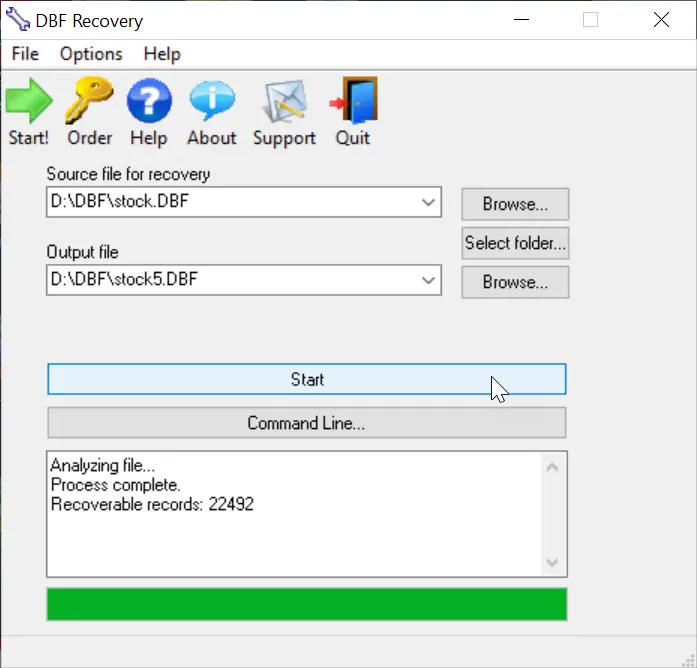
DBF Recovery empowers its users with the ability to recover a damaged database back to its pristine condition without needing the expertise to accomplish such a task or requiring the additional expense of hired recovery services. When the program runs, you see a simple interface with two main fields. Select the file for recovery in the first field and the folder for the output in the second. As an added option, you can choose to recover deleted records in the database. Once everything is set, you click on the Start button. DBF Repair Tool does the rest. It repairs the headers and data structures in an automatic process that involves no interaction with the user. After all you may not want to sit around and watch the process. With DBF Recovery, you'll truly have a lean, mean DBF repairing machine without functional fluff.
DBF Recovery Key Features
Here's just a taste of what you can do with it:
Bring your DBF files back from the dead
Have you ever tried to open the database only to discover that it won't let do so? Remember how you felt when several months of mind-numbingly tedious data entry turned into undecipherable mess of characters? So, wouldn't it be nice if you could bring your database back from the dead without the assistance of hired experts? Well, if you are in the interest of the state-of-the-art, affordable recovery technology, you're ready for DBF Recovery. Just run the DBF Repair, load the corrupt file and ta-da! The database is back to its original healthy condition!
Save your budget and even business from disaster
Too often a database is something that the company's action and the well-being of its employees depend on. A crush of a database is one of the worst nightmares not only for the system administrator but for the company in general. One study reports that a company that experiences a computer outage lasting for more than 10 days will never fully recover financially and 50 percent of such companies will be out of business in 5 years.
Repair most any DBF database
Unlike some other tools, DBF Recovery works with all popular DBF databases, including those made in Clipper, Foxbase, FoxPro, Visual Foxpro, dBASE III/IV, etc. Its Artificial Intelligence will determine the DBF format and choose the best recovery method on its own.
Run DBF Recovery in your native language
Another nice feature in DBF Repair sofware is multilingual support, letting you use the program even if English is not your native language. Currently, DBF Recovery is localized into English, German, Italian, Spanish and French with support for more languages on the way!
Start using DBF Repair Tool today!
Why wait? Add DBF Recovery to your software toolkit today. Because it's not "IF" the database will fail, it's "WHEN" this dreadful occurrence will take place. Sooner or later, it will get damaged due to a power failure or application error and heaven help you if you don't have a reliable DBF recovery tool. It's a hard lesson to learn. But with DBF Recovery, you get a fail-safe solution to repair databases without having to beat the brains to death for days trying to re-enter lost data or spending large amounts of dollars hiring a recovery service.
DBF Recovery supports 32-bit and 64-bit versions of Windows XP, Vista, Windows 7/8/10/11 and Server 2022.
An activation code will be emailed to you immediately after registration.
Registered users will receive all future versions and upgrades free, as well as virtually unlimited technical support.